

Tracking a Transfer
Prerequisites
Before tracking a transfer, you need to send it. See Sending a Transfer to get the Transfer ID.
Transfer ID
Technical Details
Transfer ID is the transaction hash of the event on the Proxy contract.
┌─────────────────────────────────────────────────────────────────┐
│                      Proxy Contract                             │
│                                                                 │
│  1. Receives tokens via transferNotification()                  │
│  2. Calls _emitTvmEvent() or _deployEvmEvent()                  │
│  3. Emits TvmTvmNative or TvmTvmAlien event                     │
│  4. Transaction hash of this event = TRANSFER ID               │
└─────────────────────────────────────────────────────────────────┘
Location in Blockchain
Transaction (on Proxy contract) ← Transaction Hash = TRANSFER ID
├── In Message (incoming tokens)
├── Out Messages
│   ├── Internal Messages (internal transfers)
│   └── External Out Message ← EVENT (TvmTvmNative/TvmTvmAlien)
└── Account (updated state)
Event Types
| Event | TokenType | Description |
|---|---|---|
TvmTvmNative | Native | Native token transfer (lock → mint) |
TvmTvmAlien | Alien | Alien token transfer (burn → unlock) |
Transfer Statuses
Two Status Levels
The system has two status levels:
| Level | Where Stored | Purpose |
|---|---|---|
| TransferStatus | Bridge Aggregator API | Aggregated status for UI/integrations |
| Event Contract Status | On-chain (Event contract) | Detailed event verification state |
Relationship: Bridge Aggregator API aggregates on-chain Event contract statuses into a simplified TransferStatus:
Event Contract Status                    →    TransferStatus (API)
─────────────────────────────────────────────────────────────────────
Initializing, Pending, Verified          →    Pending
Confirmed, LiquidityProvided             →    Completed
Rejected, Cancelled                      →    Failed
TransferStatus (API level)
Used in Bridge Aggregator API responses (/v2/transfers/status, /v2/transfers/search).
| Status | Code | Description |
|---|---|---|
Pending | 1 | Event created, awaiting confirmation in destination network |
Completed | 2 | Transfer fully completed (tokens delivered) |
Failed | 3 | Transfer rejected by relays |
Event Contract Status (on-chain level)
Detailed Event contract statuses in the blockchain. Used to understand the verification stage of the event.
| Status | Code | Description | → TransferStatus |
|---|---|---|---|
Initializing | 0 | Event contract deployed | Pending |
Pending | 1 | Awaiting verification | Pending |
Confirmed | 2 | Confirmed, proxy called, tokens delivered | Completed |
Rejected | 3 | Rejected | Failed |
Cancelled | 4 | Cancelled by user | Failed |
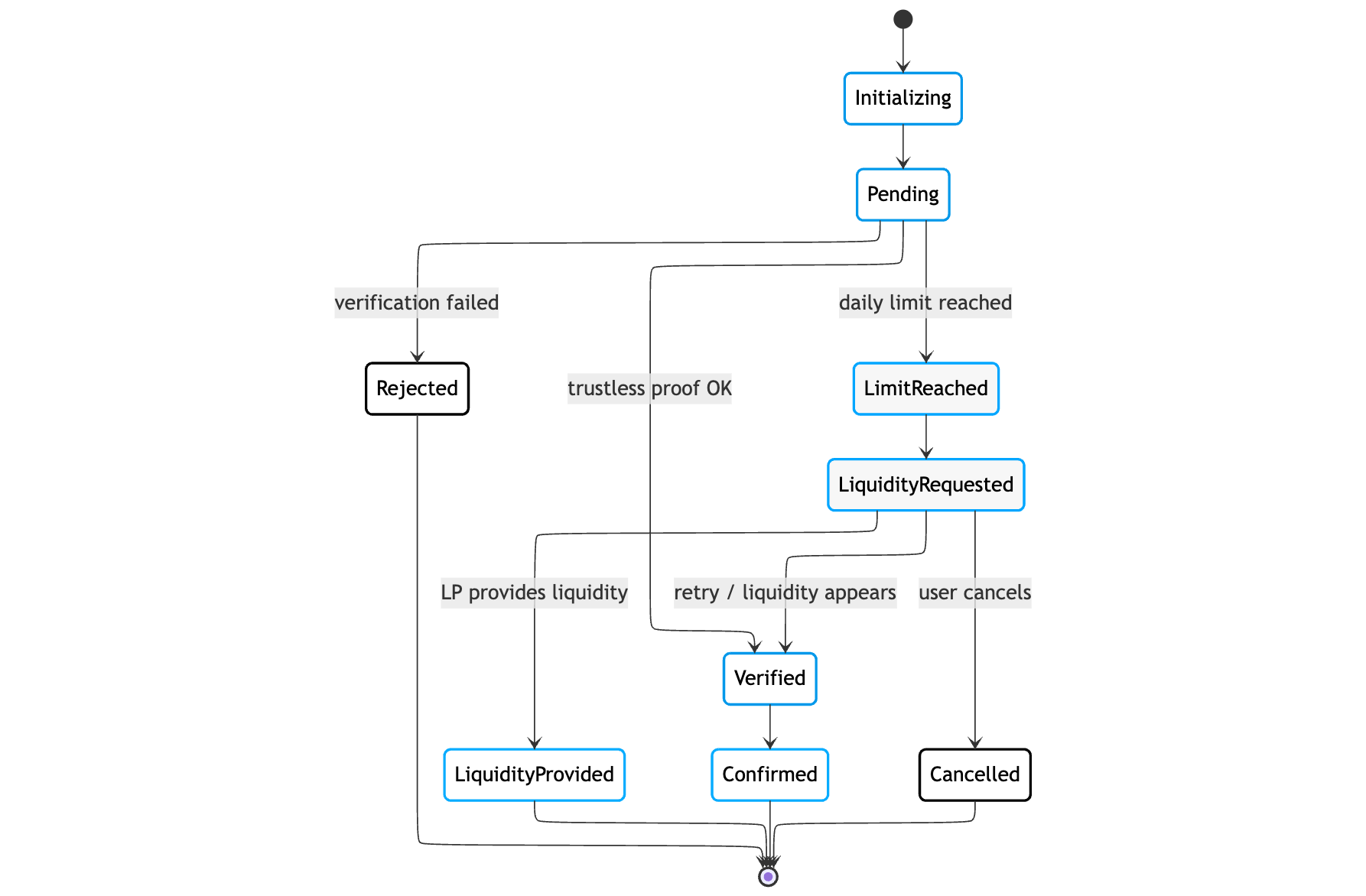
LimitReached | 5 | Daily limit exceeded, requires liquidity | Pending |
LiquidityRequested | 6 | Liquidity request created | Pending |
LiquidityProvided | 7 | Liquidity provided, tokens delivered | Completed |
Verified | 8 | Merkle proof verified, awaiting token deploy | Pending |
Trustless transition: Pending → Verified → Confirmed
Status Transition Diagram
Getting Status by Transfer ID
API Endpoint
POST https://tetra-history-api.chainconnect.com/v2/transfers/status
Content-Type: application/json
Test Environment
For testing, use https://history-api-test.chainconnect.com/v2/transfers/status
Request Parameters
Important
According to the OpenAPI specification, the field is called outgoingTransactionHash (not outgoingMessageHash)
| Parameter | Type | Required | Description |
|---|---|---|---|
outgoingTransactionHash | string | ✅ | Transfer ID (hex, 64 characters) |
dappChainId | number | ✅ | Chain ID of source network (TON = -239, Tycho = 2000) |
timestampCreatedFrom | number | ❌ | Unix timestamp for filtering (optional) |
Request Example (TvmTvm)
curl -X POST 'https://tetra-history-api.chainconnect.com/v2/transfers/status' \
  -H 'Content-Type: application/json' \
  -d '{
    "tvmTvm": {
      "outgoingTransactionHash": "abc123def456...",
      "dappChainId": -239,
      "timestampCreatedFrom": null
    }
  }'
Response Example
{
  "transfer": {
    "tvmTvm": {
      "transferStatus": "Pending",
      "timestampCreatedAt": 1767972717,
      "outgoing": {
        "tokenType": "Native",
        "chainId": -239,
        "userAddress": "0:3333...cccc",
        "tokenAddress": "0:1111...aaaa",
        "proxyAddress": "0:6666...ffff",
        "volumeExec": "0.1000",
        "volumeUsdtExec": "0",
        "feeVolumeExec": "0",
        "messageHash": "abc123def456...",
        "transactionHash": "def789abc012..."
      },
      "incoming": {
        "tokenType": "Alien",
        "chainId": 2000,
        "userAddress": "0:2222...bbbb",
        "tokenAddress": "",
        "proxyAddress": "",
        "volumeExec": "0",
        "volumeUsdtExec": "0",
        "feeVolumeExec": null,
        "messageHash": "",
        "transactionHash": null
      }
    }
  },
  "updatedAt": 1767972720,
  "notInstantTransfer": null,
  "proofPayload": {
    "txBlockProof": "te6ccgECCg...",
    "txProof": "te6ccgEBBw...",
    "messageHash": "abc123def456...",
    "outMessageIndex": 0,
    "event": {
      "tokenType": "Native",
      "chainId": 2000,
      "token": "0:1111...aaaa",
      "amount": "99000",
      "recipient": "0:2222...bbbb",
      "value": "150000000",
      "expectedGas": "0",
      "remainingGasTo": "0:3333...cccc",
      "sender": "0:3333...cccc",
      "payload": "te6ccgEBAQEAAgAAAA==",
      "nativeProxyWallet": "0:9999...2222",
      "name": "Tether USD",
      "symbol": "USD₮",
      "decimals": 6
    },
    "abiTx": {
      "tx": "te6ccgEBBwEA6AABiw/X8c8...",
      "executionAddress": "0:8888...1111",
      "attachedValue": "2000000000",
      "abiMethod": "deployEvent",
      "abi": "...",
      "params": "{\"_eventVoteData\":{...}}"
    }
  }
}
Response Field Descriptions
transfer.tvmTvm — transfer data
| Field | Type | Description |
|---|---|---|
transferStatus | string | Status: "Pending", "Completed", "Failed" |
timestampCreatedAt | number | Unix timestamp of transfer creation |
outgoing — source side data
All fields are non-nullable. Default values ("" for strings, "0" for numbers) are used when data is unavailable.
| Field | Type | Description |
|---|---|---|
tokenType | string | "Native" or "Alien" |
chainId | number | Network Chain ID |
userAddress | string | Sender address |
tokenAddress | string | Token address in source network |
proxyAddress | string | Proxy contract address |
volumeExec | string | Amount in human-readable format |
volumeUsdtExec | string | Amount in USDT equivalent |
feeVolumeExec | string | Fee charged |
messageHash | string | Event message hash |
transactionHash | string | Transaction hash (= Transfer ID) |
incoming — destination side data
Most fields are non-nullable (defaults "" / "0" while transfer is not yet completed). Only feeVolumeExec and transactionHash are nullable.
| Field | Type | Description |
|---|---|---|
tokenType | string | "Native" or "Alien" |
chainId | number | Network Chain ID |
userAddress | string | Recipient address |
tokenAddress | string | Token address in destination network (empty string until completed) |
proxyAddress | string | Proxy contract address (empty string until completed) |
volumeExec | string | Amount in human-readable format ("0" until completed) |
volumeUsdtExec | string | Amount in USDT equivalent ("0" until completed) |
feeVolumeExec | string | null | Fee charged |
messageHash | string | Event message hash (empty string until completed) |
transactionHash | string | null | Delivery transaction hash (null until completed) |
proofPayload — data for non-credit transfers
| Field | Type | Description |
|---|---|---|
txBlockProof | string | Block proof (BOC base64) |
txProof | string | Transaction Merkle proof (BOC base64) |
messageHash | string | Event message hash |
outMessageIndex | number | Index of outgoing message in transaction |
event | object | Event data (see below) |
abiTx | object | null | Ready transaction for deployEvent (see below) |
proofPayload.abiTx — ready transaction for non-credit
| Field | Type | Description |
|---|---|---|
tx | string | Transaction payload (BOC base64) |
executionAddress | string | EventConfiguration contract address |
attachedValue | string | Required gas in nano-units |
abiMethod | string | Contract method (deployEvent) |
abi | string | Contract ABI |
params | string | Call parameters (JSON string) |
proofPayload.event — event data
| Field | Type | Description |
|---|---|---|
tokenType | string | "Native" or "Alien" |
chainId | number | Destination network Chain ID |
token | string | Token address |
amount | string | Amount in nano-units |
recipient | string | Recipient address |
value | string | Attached value (gas) |
expectedGas | string | Expected gas |
remainingGasTo | string | Address for gas return |
sender | string | Sender address |
payload | string | Additional payload (BOC base64) |
nativeProxyWallet | string | null | Proxy wallet address (for Native) |
name | string | null | Token name |
symbol | string | null | Token symbol |
decimals | number | null | Number of decimals |
notInstantTransfer — liquidity request data
Not applicable for TVM↔TVM
The notInstantTransfer field is only populated for EVM-related transfers (TvmEvm, EvmEvm, TvmEvmTvm). For TVM↔TVM transfers this field is always null. Limits and insufficient liquidity are handled at the Event contract level — see Handling Limits and Liquidity Requests.
Response Interpretation
| Field | Value | Action |
|---|---|---|
transferStatus: "Pending" | Waiting | Continue polling |
transferStatus: "Completed" | Completed | Success! |
transferStatus: "Failed" | Error | Handle error |
proofPayload != null | Proof ready | Can deploy event (non-credit) |
incoming.transactionHash != null | Second part executed | Transfer almost completed |
Transfer History
API Endpoint
POST https://tetra-history-api.chainconnect.com/v2/transfers/search
Content-Type: application/json
Request Parameters
| Parameter | Type | Required | Description |
|---|---|---|---|
userAddresses | string[] | ❌ | Filter by user addresses (max 7) |
transferKinds | string[] | ❌ | Transfer type: ["TvmToTvm"] |
statuses | string[] | ❌ | Filter by statuses: ["Pending", "Completed", "Failed"] |
fromTvmChainId | number | ❌ | Source network Chain ID |
toTvmChainId | number | ❌ | Destination network Chain ID |
createdAtGe | number | ❌ | Unix timestamp >= (from date) |
createdAtLe | number | ❌ | Unix timestamp <= (to date) |
ordering | string | ❌ | Sorting: "CreatedAtAscending" or "CreatedAtDescending" |
limit | number | ✅ | Record limit (max count in response) |
offset | number | ✅ | Offset (for pagination) |
isNeedTotalCount | boolean | ✅ | Whether to return total transfer count |
Request Example
curl -X POST 'https://tetra-history-api.chainconnect.com/v2/transfers/search' \
  -H 'Content-Type: application/json' \
  -d '{
    "userAddresses": ["0:3333...cccc"],
    "transferKinds": ["TvmToTvm"],
    "statuses": ["Pending", "Completed"],
    "fromTvmChainId": -239,
    "toTvmChainId": 2000,
    "ordering": "CreatedAtDescending",
    "limit": 10,
    "offset": 0,
    "isNeedTotalCount": true
  }'
Response Example
{
  "transfers": [
    {
      "tvmTvm": {
        "transferStatus": "Completed",
        "timestampCreatedAt": 1767972717,
        "outgoing": {
          "tokenType": "Native",
          "chainId": -239,
          "userAddress": "0:3333...cccc",
          "tokenAddress": "0:1111...aaaa",
          "proxyAddress": "0:6666...ffff",
          "volumeExec": "1.0000",
          "transactionHash": "abc123..."
        },
        "incoming": {
          "tokenType": "Alien",
          "chainId": 2000,
          "userAddress": "0:2222...bbbb",
          "tokenAddress": "0:4444...dddd",
          "proxyAddress": "0:7777...0000",
          "volumeExec": "0.9990",
          "transactionHash": "def456..."
        }
      }
    }
  ],
  "totalCount": 42
}
Transfer ID for each transfer: transfers[i].tvmTvm.outgoing.transactionHash
Tracking Algorithm
┌─────────────────────────────────────────────────────────────────────────┐
│  1. GET TRANSFER ID                                                     │
│     After sending tokens to the Proxy contract, save the transaction    │
│     hash of that transaction — this is the Transfer ID                  │
└─────────────────────────────────────────────────────────────────────────┘
                                    │
                                    ▼
┌─────────────────────────────────────────────────────────────────────────┐
│  2. REQUEST STATUS                                                      │
│     POST /v2/transfers/status with Transfer ID and Chain ID             │
└─────────────────────────────────────────────────────────────────────────┘
                                    │
                                    ▼
┌─────────────────────────────────────────────────────────────────────────┐
│  3. CHECK transferStatus                                                │
│                                                                         │
│     "Pending"   → Transfer in progress, retry request in 5-10 sec       │
│     "Completed" → Success! Tokens delivered to recipient                │
│     "Failed"    → Error, transfer rejected                              │
└─────────────────────────────────────────────────────────────────────────┘
                                    │
                                    ▼
┌─────────────────────────────────────────────────────────────────────────┐
│  4. FOR COMPLETED TRANSFER                                              │
│     incoming.transactionHash — hash of token delivery transaction       │
│     incoming.volumeExec — received amount (after fees)                  │
└─────────────────────────────────────────────────────────────────────────┘
What to Check in Response
| Field | Meaning |
|---|---|
transferStatus: "Pending" | Transfer in progress — retry request |
transferStatus: "Completed" | Transfer completed — tokens delivered |
transferStatus: "Failed" | Transfer rejected — handle error |
incoming.transactionHash != null | Delivery transaction executed |
proofPayload != null | Merkle proof ready (for non-credit transfers) |
Credit vs Non-credit Transfers
| Type | Description | User Actions |
|---|---|---|
| Credit | Relays automatically deploy event and deliver tokens | Only track status |
| Non-credit | User deploys event contract themselves | Wait for proofPayload, deploy event |
For non-credit transfers:
- Wait for
proofPayloadto appear in response - Use the ready transaction from
proofPayload.abiTxto deploy the Event contract in the destination network (see Sending a Transfer) - After deploying Event contract, the transfer will complete automatically
Getting Status from Contract (on-chain)
In addition to Bridge Aggregator API, transfer status can be obtained directly from the Event contract in the blockchain. This is useful for:
- Verifying API data
- Working without dependency on centralized API
- Getting detailed on-chain status
Event Contract Address
proofPayload.abiTx.executionAddress is the EventConfiguration address, not the Event contract address. The Event contract is deployed when deployEvent is called and its address is computed deterministically via deriveEventAddress(msgHash) on EventConfiguration. To get the Event contract address, use proofPayload.messageHash and call deriveEventAddress on EventConfiguration.
Event Contract Statuses
const EVENT_STATUS = {
  0: 'Initializing',
  1: 'Pending',
  2: 'Confirmed',
  3: 'Rejected',
  4: 'Cancelled',
  5: 'LimitReached',
  6: 'LiquidityRequested',
  7: 'LiquidityProvided',
  8: 'Verified',
} as const;
Getting Status via getDetails
The Event contract has a getDetails() method that returns:
| Field | Type | Description |
|---|---|---|
_eventInitData | tuple | Initialization data: msgHash (uint256), configuration (address), chainId (int32) |
_initializer | address | Account that deployed the Event contract |
_meta | cell | Metadata from EventConfiguration |
_status | uint8 | Numeric status (see table above) |
Reading on-chain data
Reading contract state requires a TVM provider (everscale-inpage-provider). TonConnect only supports sending transactions.
import { ProviderRpcClient, Address } from 'everscale-inpage-provider';

const provider = new ProviderRpcClient();
await provider.ensureInitialized();

const eventAbi = {
  "ABI version": 2,
  functions: [{
    name: "getDetails",
    inputs: [{ name: "answerId", type: "uint32" }],
    outputs: [
      { name: "_eventInitData", type: "tuple", components: [
        { name: "msgHash", type: "uint256" },
        { name: "configuration", type: "address" },
        { name: "chainId", type: "int32" },
      ]},
      { name: "_initializer", type: "address" },
      { name: "_meta", type: "cell" },
      { name: "_status", type: "uint8" },
    ],
  }],
  events: [],
} as const;

const eventAddress = new Address('0:1234...abcd'); // Event contract address
const eventContract = new provider.Contract(eventAbi, eventAddress);

const { _status, _initializer, _eventInitData } = await eventContract.methods
  .getDetails({ answerId: 0 })
  .call();

const statusName = EVENT_STATUS[Number(_status) as keyof typeof EVENT_STATUS];
console.log('Event status:', statusName); // e.g.: "Verified"
Getting Event Data via getDecodedData
The getDecodedData() method returns decoded event data, including the bounty (reward for LP). Uses the same provider and eventAddress from the example above.
Different Return Types
The response structure differs for Native and Alien Event contracts. Use the appropriate ABI.
const nativeEventAbi = {
  "ABI version": 2,
  functions: [{
    name: "getDecodedData",
    inputs: [{ name: "answerId", type: "uint32" }],
    outputs: [
      { name: "token_", type: "address" },
      { name: "name_", type: "string" },
      { name: "symbol_", type: "string" },
      { name: "decimals_", type: "uint8" },
      { name: "sender_", type: "address" },
      { name: "amount_", type: "uint128" },
      { name: "recipient_", type: "address" },
      { name: "value_", type: "uint128" },
      { name: "expected_gas_", type: "uint128" },
      { name: "payload_", type: "optional(cell)" },
      { name: "proxy_", type: "address" },
      { name: "tokenWallet_", type: "address" },
      { name: "bounty_", type: "uint128" },
    ],
  }],
  events: [],
} as const;

const eventContract = new provider.Contract(nativeEventAbi, eventAddress);
const data = await eventContract.methods.getDecodedData({ answerId: 0 }).call();

console.log('Token:', data.symbol_);
console.log('Amount:', data.amount_);
console.log('Recipient:', data.recipient_.toString());
console.log('Bounty:', data.bounty_);const alienEventAbi = {
"ABI version": 2,
functions: [{
name: "getDecodedData",
inputs: [{ name: "answerId", type: "uint32" }],
outputs: [
{ name: "base_chainId_", type: "int32" },
{ name: "base_token_", type: "address" },
{ name: "base_native_proxy_wallet_", type: "address" },
{ name: "name_", type: "string" },
{ name: "symbol_", type: "string" },
{ name: "decimals_", type: "uint8" },
{ name: "amount_", type: "uint128" },
{ name: "recipient_", type: "address" },
{ name: "attached_gas_", type: "uint128" },
{ name: "expected_gas_", type: "uint128" },
{ name: "payload_", type: "optional(cell)" },
{ name: "proxy_", type: "address" },
{ name: "token_", type: "address" },
{ name: "native_proxy_token_wallet", type: "optional(address)" },
],
}],
events: [],
} as const;
const eventContract = new provider.Contract(alienEventAbi, eventAddress);
const data = await eventContract.methods.getDecodedData({ answerId: 0 }).call();
console.log('Token:', data.symbol_);
console.log('Amount:', data.amount_);
console.log('Recipient:', data.recipient_.toString());
console.log('Base chain:', data.base_chainId_);Handling Limits and Liquidity Requests
Sometimes after deploying the Event contract, tokens are not delivered immediately. This happens in two cases:
| Situation | Event Status | What Happened | Which Tokens |
|---|---|---|---|
| Limit exceeded | LimitReached (5) | Amount exceeds daily security limit | Native and Alien |
| Insufficient liquidity | LiquidityRequested (6) | Proxy contract doesn't have enough tokens to unlock | Native in destination network only |
In both cases, tokens are not lost — they are locked in the Event contract until the situation is resolved.
Why Alien tokens don't hit LiquidityRequested?
Alien tokens (not native to the destination network) are minted (created) during transfer, not taken from the proxy balance. Therefore, insufficient liquidity is impossible for them. Native tokens (native to the destination network) are unlocked from the proxy — if the proxy doesn't hold enough locked tokens, LiquidityRequested occurs.
How to Determine if a Transfer is Delayed
Via API: transferStatus remains "Pending", while the on-chain Event contract status is 5 (LimitReached) or 6 (LiquidityRequested).
Via on-chain: call getDetails() on the Event contract:
const { _status } = await eventContract.methods.getDetails({ answerId: 0 }).call();

if (Number(_status) === 5) {
  console.log('Daily limit exceeded — awaiting approval');
} else if (Number(_status) === 6) {
  console.log('Insufficient liquidity — can set bounty, cancel, or retry');
}
User Actions
| Action | When Available | Who Can Call | Description |
|---|---|---|---|
| Set Bounty | LiquidityRequested (6) | sender / recipient | Set a reward for liquidity provider |
| Cancel | LiquidityRequested (6) | sender / recipient | Cancel transfer and return tokens |
| Cancel | LimitReached (5) | limitApprover only | Reject the transfer (administrator) |
| Retry | LimitReached (5) / LiquidityRequested (6) | sender / recipient / initializer | Retry after limit approval or liquidity becomes available |
Set Bounty — Setting a Reward
Sets a reward for the liquidity provider. Available only in LiquidityRequested (6) status. Can be called by sender or recipient.
import { ProviderRpcClient, Address } from 'everscale-inpage-provider';

const provider = new ProviderRpcClient();
await provider.ensureInitialized();

const eventAbi = {
  "ABI version": 2,
  functions: [{
    name: "setBounty",
    inputs: [{ name: "_bounty", type: "uint128" }],
    outputs: [],
  }],
  events: [],
} as const;

const eventAddress = new Address('0:1234...abcd'); // Event contract address
const eventContract = new provider.Contract(eventAbi, eventAddress);

const senderAddress = new Address('0:3333...cccc'); // sender or recipient

await eventContract.methods
  .setBounty({ _bounty: '1000000000' }) // 1 token in nano-units
  .send({
    from: senderAddress,
    amount: '500000000', // 0.5 for gas
    bounce: true,
  });

console.log('Bounty set');
Cancel — Cancelling a Transfer
Cancels the transfer and returns tokens to the specified address. Available in LiquidityRequested (6) status for sender/recipient, and in LimitReached (5) for limitApprover.
Different Parameters for Native and Alien
Alien Event contract requires an additional _predeployedTokenData parameter. Not needed for Native.
import { ProviderRpcClient, Address } from 'everscale-inpage-provider';

const provider = new ProviderRpcClient();
await provider.ensureInitialized();

const nativeEventAbi = {
  "ABI version": 2,
  functions: [{
    name: "cancel",
    inputs: [
      { name: "_newRecipient", type: "address" },
      { name: "_remainingGasTo", type: "address" },
      { name: "_expectedGas", type: "uint128" },
      { name: "_eventPayload", type: "optional(cell)" },
      { name: "_expectedGasReceiver", type: "address" },
    ],
    outputs: [],
  }],
  events: [],
} as const;

const eventAddress = new Address('0:1234...abcd');
const eventContract = new provider.Contract(nativeEventAbi, eventAddress);

const senderAddress = new Address('0:3333...cccc');

await eventContract.methods
  .cancel({
    _newRecipient: senderAddress,         // Where to return tokens
    _remainingGasTo: senderAddress,       // Where to return remaining gas
    _expectedGas: '0',
    _eventPayload: null,                  // No additional payload
    _expectedGasReceiver: senderAddress,
  })
  .send({
    from: senderAddress,
    amount: '1000000000', // 1.0 for gas
    bounce: true,
  });

console.log('Transfer cancelled');import { ProviderRpcClient, Address } from 'everscale-inpage-provider';
const provider = new ProviderRpcClient();
await provider.ensureInitialized();
const alienEventAbi = {
"ABI version": 2,
functions: [{
name: "cancel",
inputs: [
{ name: "_newRecipient", type: "address" },
{ name: "_remainingGasTo", type: "address" },
{ name: "_expectedGas", type: "uint128" },
{ name: "_eventPayload", type: "optional(cell)" },
{ name: "_predeployedTokenData", type: "optional(cell)" },
{ name: "_expectedGasReceiver", type: "address" },
],
outputs: [],
}],
events: [],
} as const;
const eventAddress = new Address('0:1234...abcd');
const eventContract = new provider.Contract(alienEventAbi, eventAddress);
const senderAddress = new Address('0:3333...cccc');
await eventContract.methods
.cancel({
_newRecipient: senderAddress,
_remainingGasTo: senderAddress,
_expectedGas: '0',
_eventPayload: null,
_predeployedTokenData: null,
_expectedGasReceiver: senderAddress,
})
.send({
from: senderAddress,
amount: '1000000000',
bounce: true,
});
console.log('Transfer cancelled');Retry — Retrying Delivery
Retries token delivery. Use after:
- Limit approval by administrator (from
LimitReachedstatus) - Liquidity becomes available on proxy (from
LiquidityRequestedstatus)
import { ProviderRpcClient, Address } from 'everscale-inpage-provider';

const provider = new ProviderRpcClient();
await provider.ensureInitialized();

const eventAbi = {
  "ABI version": 2,
  functions: [{
    name: "retry",
    inputs: [],
    outputs: [],
  }],
  events: [],
} as const;

const eventAddress = new Address('0:1234...abcd');
const eventContract = new provider.Contract(eventAbi, eventAddress);

const senderAddress = new Address('0:3333...cccc');

await eventContract.methods
  .retry({})
  .send({
    from: senderAddress,
    amount: '500000000', // 0.5 for gas
    bounce: true,
  });

console.log('Retry sent — transfer will move to Verified status');